 Talpha







How it works
A candidate sees the Sales Manager vacancy on LinkedIn and applies directly from the app — the bot opens in the browser. They upload a CV, the bot asks clarifying questions based on the job requirements. The candidate responds by voice. AI analyzes the answers and forms a score — the recruiter receives a shortlist without a single call.
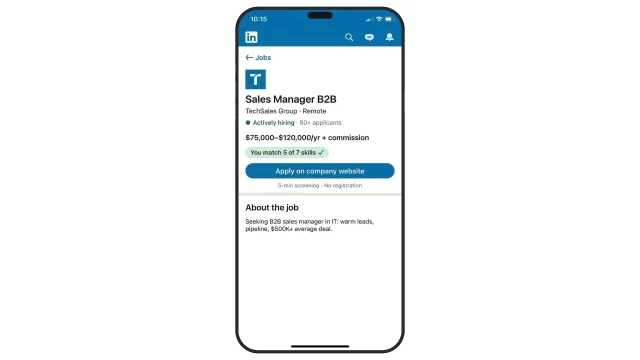
The candidate sees the Sales Manager vacancy on LinkedIn and applies directly from the app — 5-minute screening, no calls, no registration.
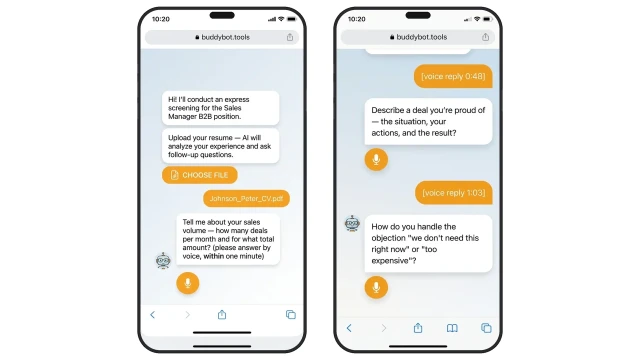
The bot analyzes the resume and asks voice questions based on the job requirements. The candidate responds by voice.
Example questions for Sales Manager B2B:
❓ Tell me about your sales volume — how many deals per month and for what total amount?
✅ Names specific numbers: deal count, average ticket, annual revenue — not "a lot" or "good"
❓ Describe a deal you're proud of — situation, your actions, the result?
✅ Structured answer: clear client problem, specific steps, measurable result
❓ Which CRM do you use — how do you manage your client base and pipeline?
✅ Names a specific system (HubSpot, Salesforce, Pipedrive), describes configuration and what was tracked
AI scores each answer by criteria and assigns a final score of 0–100
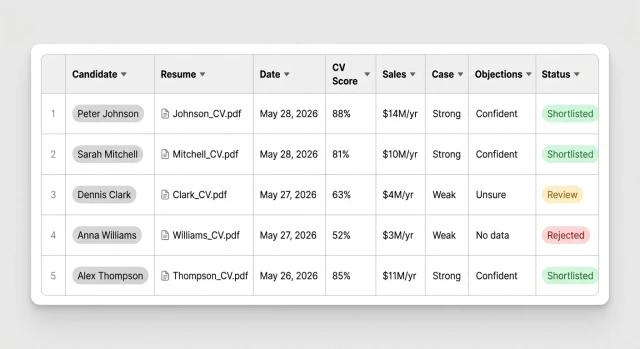
AI generates a card for each candidate: CV score, answers to questions, total score and status — Shortlisted, Review, or Rejected. The recruiter sees a ready-made priority list without manually sorting applications. Data is automatically sent to your ATS or CRM — Workday, HubSpot, Salesforce — via Webhook.