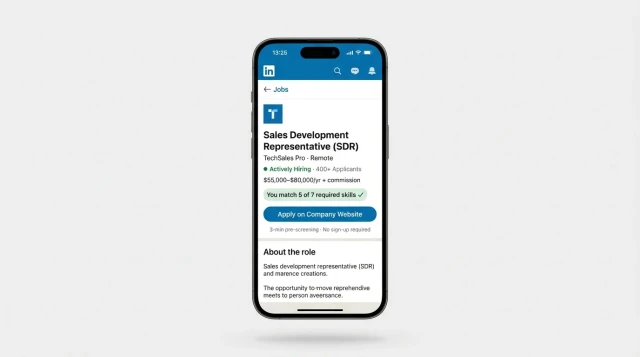
1. Purchase a subscription plan
Starter+ plan from $19/mo — includes everything you need to launch the bot.
2. Copy the template and book a setup call
After copying the template, book a call with our manager — they will help with configuration.
3. Define your SDR qualification criteria
Set up 3–4 voice questions for your vacancy. Recommended questions for SDR:
• Tell me about your best deal — from first contact to close
• What is your average deal cycle and contact-to-meeting conversion?
• How do you handle rejection — what do you say to the prospect?
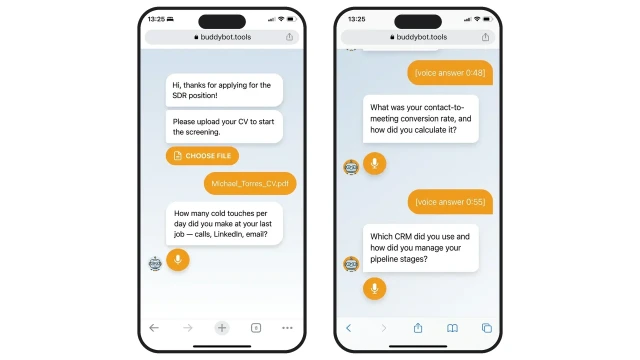
• How many cold touches per day did you make at your last job?
4. Insert the AI evaluation prompt
Example prompt for sales candidate qualification:
You are an AI recruiter. Evaluate the candidate for an SDR role based on CV and voice answers. Criteria: 1. B2B sales experience 2+ years (BANT qualification). 2. Cold outreach: 50–80+ touches/day. 3. Concrete numbers: conversion rate, average deal size, deal cycle. 4. CRM experience (Salesforce, HubSpot, Pipedrive). 5. Clear speech, confidence, specific examples. 6. Objection handling skills. Give a score 0–100 per criterion and a final verdict: ✅ Shortlist / 🟡 Under consideration / ❌ Not suitable.
5. Our manager will reach out
The manager will help configure the bot, AI prompt, and launch screening.
ATS integration: send screening results to Greenhouse, Workable, Lever or HubSpot via Webhook.
Additional questions: add a case question — “Sell me your previous product in 60 seconds” — to assess presentation skills.
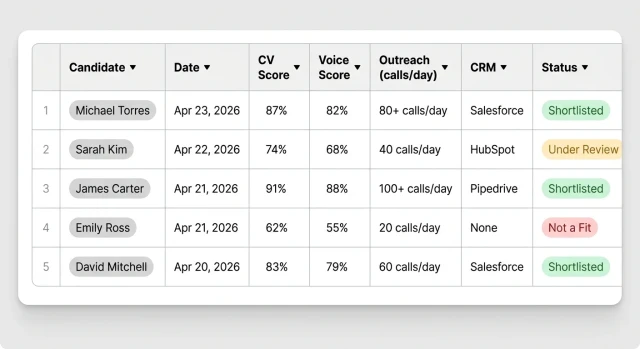
Results table includes columns: Candidate · Date · CV Score · Voice Score · Outreach Activity (calls/day) · CRM · Final Status — all in one place for quick comparison.
Auto-notifications: the candidate gets a confirmation immediately after screening, HR receives a notification via Telegram or email.
Will candidates drop off during screening?
Completion rates for similar solutions are 55–70%. Key factors: the bot asks nothing unnecessary (3–4 steps), voice answers take up to 2 minutes, the interface is a familiar mobile browser with no app install required.
How is candidate personal data handled?
CVs and voice answers are stored in BuddyBot’s secure storage (EU servers). Access is limited to authorised staff only. Data is deleted on the candidate’s request in accordance with GDPR. The candidate is notified about recording before screening begins.
How long does screening take for the candidate?
On average 3–5 minutes: CV upload (30 sec), 2–3 voice questions of 60 sec each. The candidate completes screening at any convenient time — the bot runs 24/7.
What if a candidate doesn’t want to answer by voice?
Voice answers are optional — the candidate can type instead. The bot automatically offers a text alternative if voice is not enabled or the device does not support recording.
How does AI evaluate candidates — can the decision be contested?
AI generates a structured profile: CV fit, speech tone and confidence, completeness of answers. The final decision is made by HR — AI only prioritises. All scores with comments are visible in the results table.
How many candidates can the bot process simultaneously?
There is no limit on parallel sessions — the bot scales automatically. For 500+ applications (mass hiring), the Business plan with dedicated support is recommended.
What language does the bot work in?
Language is configurable per vacancy: English, or bilingual mode. AI analysis works with both languages. For international hiring, the interface language and question language can be set independently.
Can the template be adapted for another vacancy?
Yes — the template is universal. Change the AI evaluation prompt (in the AI block settings), the bot questions, and the vacancy link. One BuddyBot account supports unlimited copies of the template for different positions.
Does the candidate receive feedback after screening?
The bot automatically sends the candidate a confirmation of receipt. Further communication is at the company’s discretion: you can set up an auto-reply with the result or hand off to a live recruiter.
Does it integrate with ATS?
Yes — via Webhook or BuddyBot API, data is sent to popular ATS: Greenhouse, Workable, Lever, HubSpot. The results table can also be exported to Excel/Google Sheets manually or automatically.
 Talpha