 Talpha







How it works
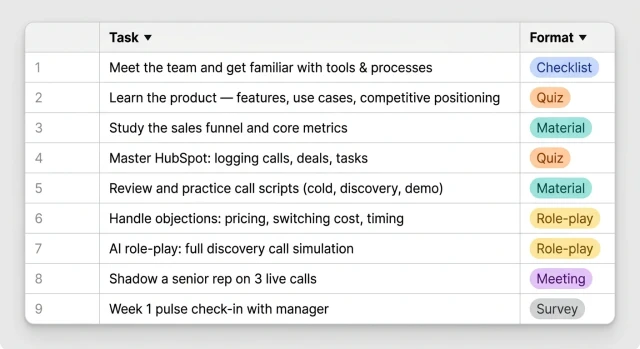
HR sends the new rep a link — via email or LinkedIn. The rep opens the bot in Telegram and gets their 30-day ramp plan right away. The bot guides them through every stage: product and HubSpot in week one, AI role-play with a simulated buyer in week two, first independent deals by end of the month.
From day one, the rep knows exactly what to do and who to ask — no pile of docs or hour-long onboarding calls.
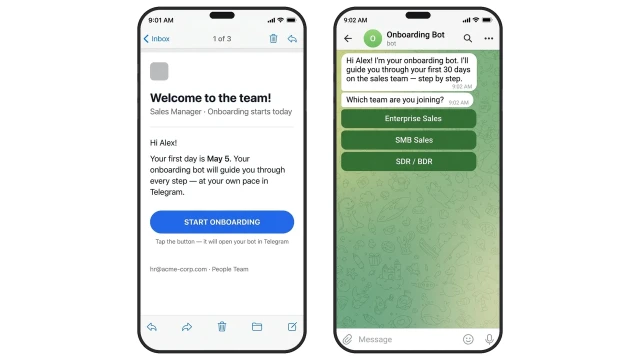
Every day the bot sends the next task in the ramp plan: what to learn, what to complete, what to mark done.
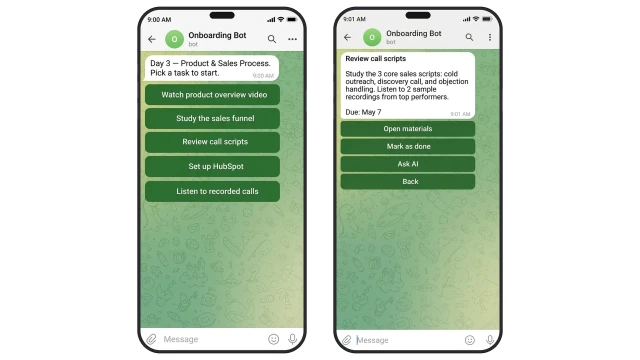
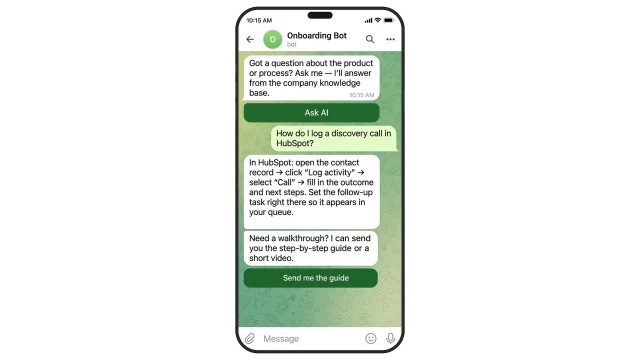
If the rep has a question, the AI assistant answers from the company knowledge base and helps complete the task — no need to ping HR or a buddy.
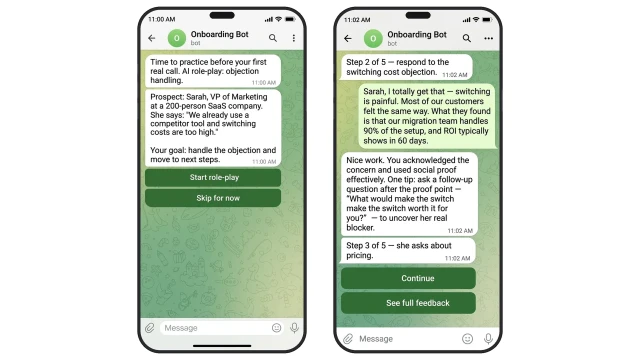
In week two, the bot offers a practice session before the first real call: AI plays a buyer and runs a scripted objection-handling scenario. The rep handles objections, the bot debriefs each answer — what worked and what to improve. By the first real call, they already have 5–10 practice conversations under their belt.
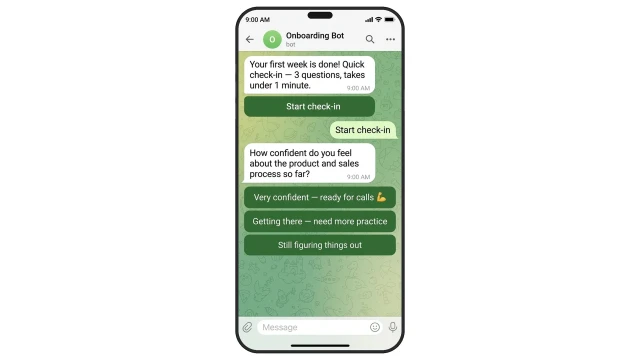
On day 7 and day 30, the bot sends a pulse check-in automatically. The manager finds out about issues before the rep starts looking for another job.
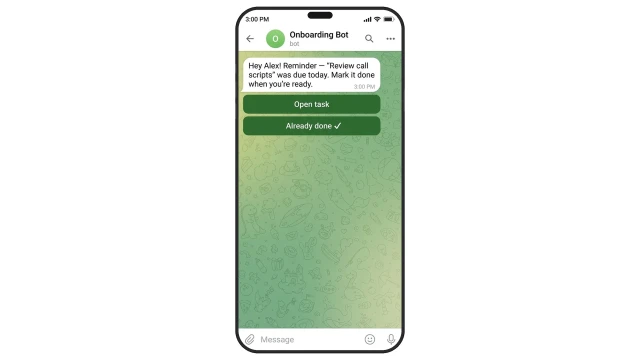
If the rep misses a deadline, the bot automatically sends a reminder — no manual follow-up from HR or the manager.
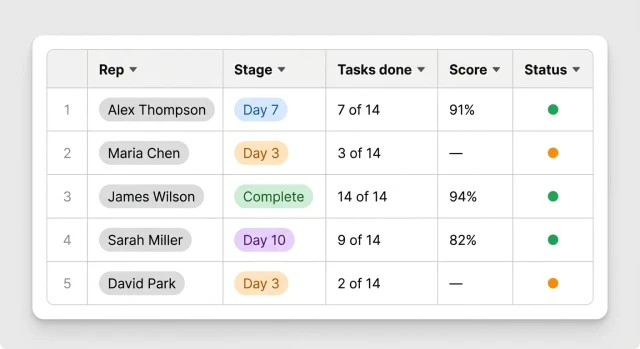
While reps go through onboarding, the manager sees each person's progress in a shared dashboard: current stage, tasks completed, and quiz scores.
The template comes with a pre-built 30-day sales ramp plan — tasks load automatically, you just adapt them to your products and processes.
Day 1.
Task: Meet the team and get oriented.
What to do: Meet your buddy and HR, get introduced to the team. Company overview: history, mission, values. Resolve logistics: access, workspace, lunch options.
How to verify: Check off the Day 1 checklist in the bot.
Day 2.
Task: Learn the product and company tools.
What to do: Watch product overview videos. Take a quiz: how we differ from competitors. Get set up in HubSpot and company tools. Post in the team Slack. Meet with your manager.
How to verify: Pass the product quiz in the bot.
Week 1. Day 3.
Task: Dive into the sales process.
What to do: Study the customer journey from lead to close — bot scenario with micro-videos from the sales manager. Review the sales framework: funnel, scripts, playbooks. Analyze recorded calls: what works, what to improve.
How to verify: Mark complete in the bot.
Day 4.
Task: Practice scripts.
What to do: Study scripts and practice cold outreach on simulators. Complete a HubSpot bot-test: task setup, contact logging.
How to verify: Complete the bot quiz with 80% or higher.
Day 5.
Task: Learn from the team's best practices.
What to do: Shadow your buddy for the day. Take the Week 1 wrap-up quiz. Top scores are posted in the team channel.
How to verify: Buddy's score logged in the bot.
Week 2. Day 6.
Task: Start practice calls and objection handling.
What to do: Log your Week 1 KPIs. Make first calls on warm leads. Complete a 20-minute objection handling simulator session.
How to verify: Call results logged in HubSpot, completion marked in the bot.
Day 7.
Task: Get feedback on your calls.
What to do: Make practice calls. Listen back and debrief with your buddy.
How to verify: Debrief marked in the bot.
Day 8.
Task: Continue objection training.
What to do: Make calls and complete an objection handling simulator session.
How to verify: Results logged in the bot.
Day 9.
Task: Master working with documents.
What to do: Make practice calls. Join a product demo. Prepare a follow-up. Log data in HubSpot.
How to verify: Data logged in HubSpot, completion marked in the bot.
Day 11.
Task: Checkpoint.
What to do: Meet with buddy, complete Week 2 assessment, log KPIs.
How to verify: Assessment results and KPIs automatically sent to manager.
Task: Meet the team and get oriented.
What to do: Meet your buddy and HR, get introduced to the team. Company overview: history, mission, values. Resolve logistics: access, workspace, lunch options.
How to verify: Check off the Day 1 checklist in the bot.
Day 2.
Task: Learn the product and company tools.
What to do: Watch product overview videos. Take a quiz: how we differ from competitors. Get set up in HubSpot and company tools. Post in the team Slack. Meet with your manager.
How to verify: Pass the product quiz in the bot.
Week 1. Day 3.
Task: Dive into the sales process.
What to do: Study the customer journey from lead to close — bot scenario with micro-videos from the sales manager. Review the sales framework: funnel, scripts, playbooks. Analyze recorded calls: what works, what to improve.
How to verify: Mark complete in the bot.
Day 4.
Task: Practice scripts.
What to do: Study scripts and practice cold outreach on simulators. Complete a HubSpot bot-test: task setup, contact logging.
How to verify: Complete the bot quiz with 80% or higher.
Day 5.
Task: Learn from the team's best practices.
What to do: Shadow your buddy for the day. Take the Week 1 wrap-up quiz. Top scores are posted in the team channel.
How to verify: Buddy's score logged in the bot.
Week 2. Day 6.
Task: Start practice calls and objection handling.
What to do: Log your Week 1 KPIs. Make first calls on warm leads. Complete a 20-minute objection handling simulator session.
How to verify: Call results logged in HubSpot, completion marked in the bot.
Day 7.
Task: Get feedback on your calls.
What to do: Make practice calls. Listen back and debrief with your buddy.
How to verify: Debrief marked in the bot.
Day 8.
Task: Continue objection training.
What to do: Make calls and complete an objection handling simulator session.
How to verify: Results logged in the bot.
Day 9.
Task: Master working with documents.
What to do: Make practice calls. Join a product demo. Prepare a follow-up. Log data in HubSpot.
How to verify: Data logged in HubSpot, completion marked in the bot.
Day 11.
Task: Checkpoint.
What to do: Meet with buddy, complete Week 2 assessment, log KPIs.
How to verify: Assessment results and KPIs automatically sent to manager.