 Talpha





How it works
On first launch, the employee authenticates through the bot — enters their corporate email or full name — and gets access to the self-service portal with sections tailored to their role and department.
HR sets up the bot once: loads the knowledge base for the AI FAQ, connects CRM and LMS, configures the corporate store catalog and employee directory by department. From then on, the bot works independently — receives requests, answers questions, enrolls in courses, shows tasks from CRM. Employees interact in their preferred messenger: Telegram, Slack, or a corporate app.
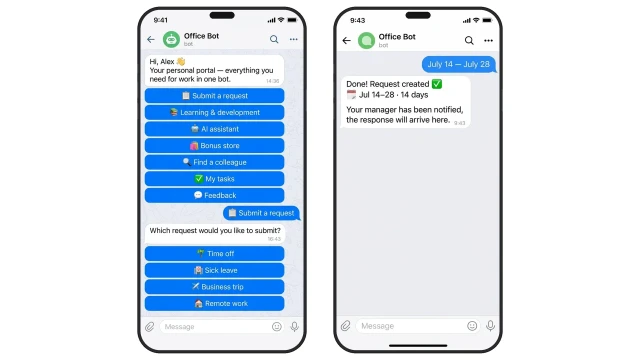
The employee sees a main menu with 7 sections immediately when opening the bot. Each section leads to its own flow. A time-off request is created in CRM in 3 messages: select type, enter dates, confirm. The manager gets a notification automatically.
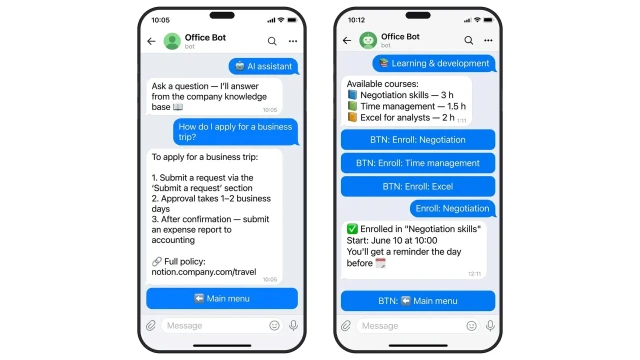
The AI assistant answers HR questions from the company's knowledge base — regulations, policies, guides. The training section connects to LMS: the employee sees available courses, chooses, and enrolls in one tap.
What the AI FAQ can do:
❓ How to apply for a business trip, vacation, sick leave
✅ Step-by-step answer from the knowledge base in 3 seconds
❓ How to get a certificate or document
✅ Instructions + link to the relevant policy
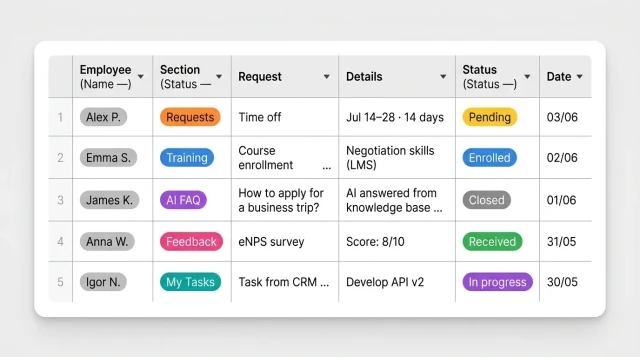
HR sees all employee requests in one table in real time: section, request type, details, status, date. The filter by section shows only applications, only training, or only feedback.
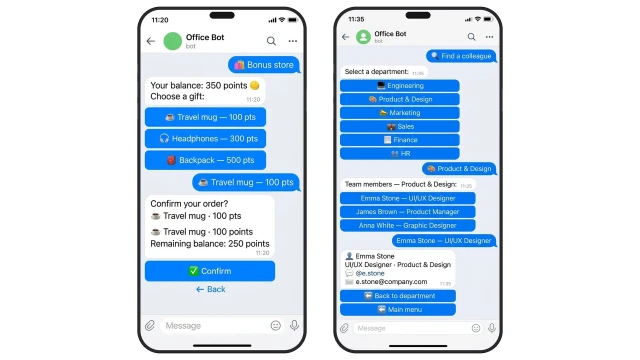
The corporate bonus store shows the employee's balance and gift catalog — choose and order in two clicks directly in the bot. The employee directory works by department: select department, select person — get contact details and email in the messenger.