




header.phone_number boris@borisbot.com

Hiring Couriers via LinkedIn Jobs: Auto-Screening + Workday

Bot screens courier applicants from LinkedIn Jobs, saves qualified candidates to Workday, and continues in Telegram.

You need to log in to see the interactive example.

You need to log in to see the interactive example

Copyright protection from copying

landing.complain

A candidate applies for a courier job on LinkedIn Jobs or Indeed — and immediately receives a bot link in their inbox. Three button questions filter out unsuitable applicants automatically. Those who pass are marked Qualified in Workday: the bot finds the candidate by phone number and updates the card or creates a new one. Screening answers are saved in the card — HR knows everything before the call. In Telegram, the bot briefly introduces the company and confirms that HR will be in touch shortly. Unsuccessful candidates receive a referral link: recommend a suitable friend and get a bonus if they are hired.

Why it works

⚡ Instant reply — candidates do not wait for a call, HR skips irrelevant applicants

🎯 Buttons instead of forms — minimal barrier, even reluctant users complete the screening

🔁 Referral mechanic — rejected candidates bring new applicants at zero ad spend

📲 Candidate stays in Telegram — re-engage anytime with broadcasts and bot notifications

Solution KPIs

⏱ −80% of HR time spent on manual screening calls

📋 100% of applications processed automatically — none are lost

📁 Status Qualified and answers already in the Workday card — HR calls prepared, no duplicate questions

👥 +15–20% more candidates via referral channel at no extra cost

Who it is for

Built for a delivery courier service, adapts to any mass hiring of frontline staff: couriers, cashiers, call centre agents, warehouse workers, packers, promoters, security guards.

How it works

A candidate applies on LinkedIn Jobs or Indeed — and instantly receives a bot link. Three button questions filter unsuitable applicants automatically. Those who pass get the status Qualified in Workday: the bot finds them by phone number and updates or creates their card. Screening answers are saved in the card and HR sees everything before the call. In Telegram, the bot introduces the company and lets the candidate know HR will be in touch. Rejected candidates receive a referral link: recommend a suitable friend — get a bonus if they are hired.
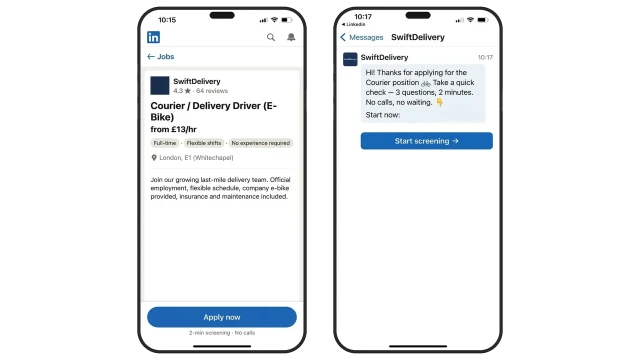
Job posted on LinkedIn Jobs or Indeed — every new application gets an automatic reply with a bot link. The candidate completes the check in 2 minutes, no phone call required.
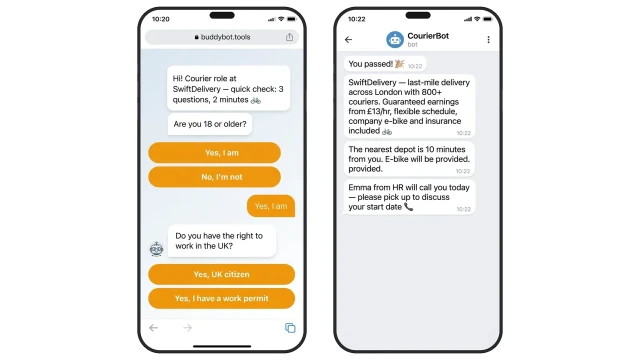
Three screening questions — the bot automatically filters candidates who do not meet the minimum requirements.

Example questions:

❓ Are you 18 or older?

✅ Adults only — required by UK employment law

❓ Do you have the right to work in the UK?

✅ UK citizen or valid work permit

❓ Do you have a bike or scooter, or are you happy to use a company one?

✅ Any answer except "no" — candidate continues screening

Once all questions are answered the conversation automatically moves to Telegram.
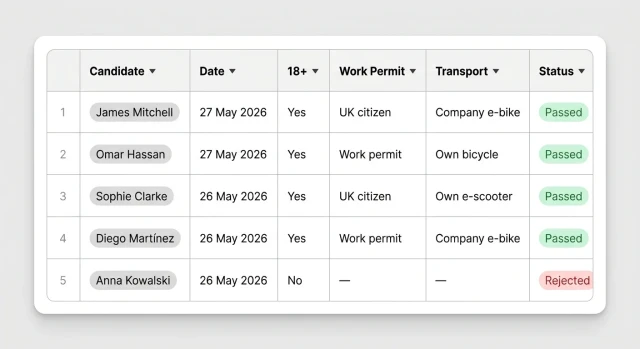
All candidate responses are saved to a table in real time — no manual data entry required.
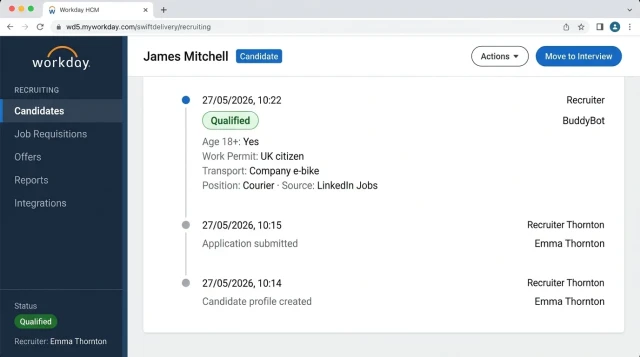
The bot finds the candidate in Workday by phone number — updates the existing card or creates a new one. Status is set to Qualified, screening answers are saved to the card. No duplicates — HR works with a clean database.

How to get started

This template runs on the Business plan. Setup for your vacancies — from €99 one-off, pay after verifying the result.

1. Subscribe to the Business plan

This starts the setup process and unlocks access to integrations

2. A BuddyBot specialist will contact you

They will discuss your vacancy, screening questions, and Workday + Telegram connection

3. Bot is ready within 3 days

We connect LinkedIn Jobs or Indeed, configure the screening flow, and test everything

4. Pay for setup — from €99

Only after you confirm everything is working as expected

What else can be connected

🤖 AI scoring — instead of buttons, the bot analyses free-text answers and assigns a score to each candidate.

📱 Indeed — same integration with Indeed applications: one bot handles both job boards.

💬 WhatsApp — alternative to Telegram: the bot moves the conversation from the browser directly to WhatsApp.

📊 Analytics — conversion rate at every stage of the hiring funnel.

Frequently asked questions

What does a rejected candidate see?

The bot politely informs them they do not meet the requirements and offers a referral link: if they recommend a suitable friend who gets hired, they receive a bonus.

Do I still need to post the job on LinkedIn separately?

Yes. You post the vacancy on LinkedIn Jobs or Indeed as usual. BuddyBot connects via API and responds to every new application automatically.

Is the phone number entered manually?

No — data is pulled from the applicant profile on LinkedIn or Indeed. The candidate does not need to fill in anything.

Can I add other screening questions?

Yes. Questions are configured in the BuddyBot builder with no coding — experience, location, availability, and any other criteria.

Does the template work for other roles?

Yes. The flow adapts to any frontline role: cashiers, call centre agents, warehouse staff, promoters. Just change the question text.

Can I run multiple vacancies at the same time?

Yes. Each vacancy is connected separately — its own screening questions and its own Workday queue.