




header.phone_number boris@borisbot.com

Hire Warehouse Packers: Auto-Screening + Workday

Bot qualifies LinkedIn applicants, saves qualified ones to Workday and continues conversation in Telegram.

You need to log in to see the interactive example.

You need to log in to see the interactive example

Copyright protection from copying

landing.complain

Every day new applications arrive for warehouse packer roles — most do not meet requirements. Instead of manual calls, the bot contacts every applicant, sends a link to a quick browser check, and passes the result straight to Workday. Qualified candidates continue the conversation in Telegram; unqualified ones receive a referral link to recommend a suitable friend for a bonus.

Why it works

⚡ Instant result — candidates do not wait for a call, HR does not waste time on irrelevant applicants

🎯 Buttons instead of forms — low friction, even reluctant form-fillers complete the screening

🔁 Referral mechanic — rejected candidates bring new ones without ad spend

📲 Candidate stays in Telegram — enables follow-up messages and shift notifications

Key metrics

⏱ Screening takes 2 minutes — HR response same day

📊 Up to 80% of unqualified candidates filtered automatically

🔗 LinkedIn + Workday integration — no manual data entry

💬 Telegram for post-screening communication

Who it is for

Built for warehouse and fulfilment centre operators in the UK and US. Adapts to any high-volume blue-collar recruitment: logistics, retail, production.

How it works

An applicant applies on LinkedIn — and immediately receives a link to the bot. Three button questions automatically filter out unsuitable candidates. Those who pass receive "Qualified" status in Workday: the bot finds the candidate by phone number and updates their card or creates a new one. Screening answers are saved in the card, HR sees everything before the call. In Telegram the bot briefly introduces the company and confirms that HR will be in touch. Those who do not pass receive a referral link: if they recommend a suitable friend who gets hired, they receive a bonus.
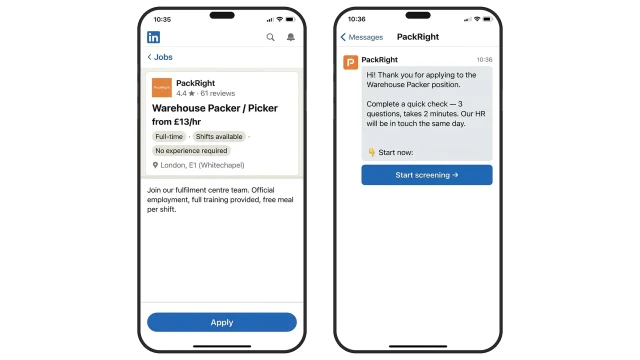
The job is posted on LinkedIn — the auto-reply is sent immediately after application. The candidate receives a link and opens the bot in their browser to complete the check in 2 minutes.
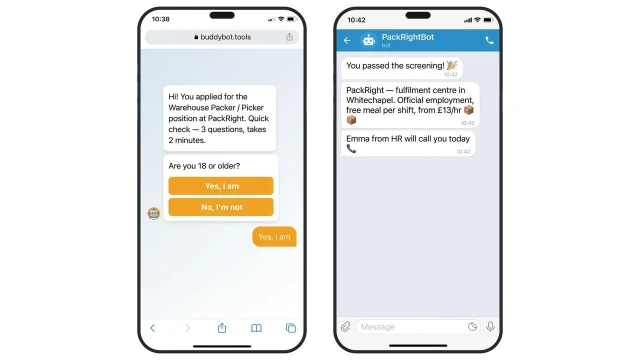
Three screening questions — the bot automatically filters those who do not meet minimum requirements.

Example questions:

❓ Are you 18 or older?

✅ Adults only — mandatory legal requirement

❓ Do you have the right to work in the UK?

✅ UK citizen or valid work permit

❓ No medical restrictions for physical labour and standing work?

✅ Basic job requirement — needed for the medical check

After passing, the bot sends a confirmation in Telegram and notifies the recruiter.
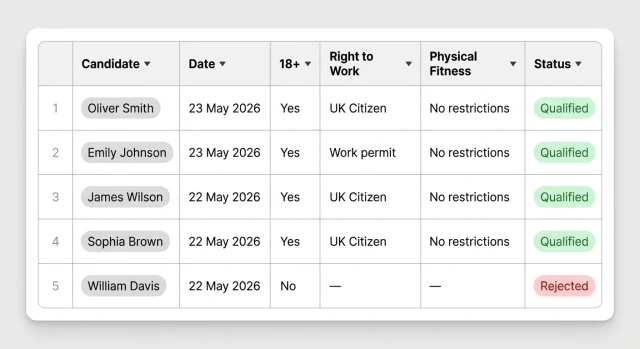
All candidate answers are saved to a table in real time, with no manual data entry.
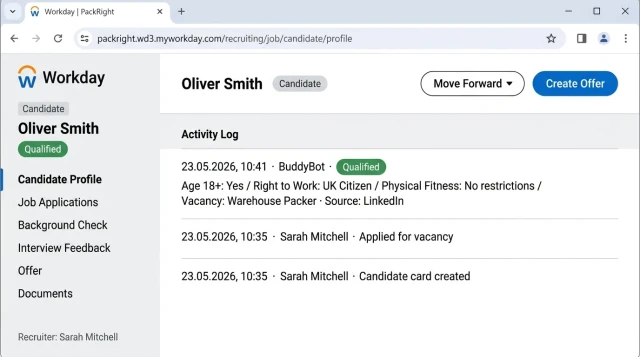
The bot finds the candidate in Workday by phone number — updates the existing card or creates a new one. Status changes to "Qualified", screening answers are saved in the card. No duplicates — HR works with a clean database.

How to get started

Template runs on the Business plan. Setup for your vacancies from €25 once-off, payment after checking the result.

1. Subscribe to the Business plan

This starts the setup process and opens access to integrations

2. A BuddyBot specialist will contact you

They will discuss the vacancy, screening questions, LinkedIn + Workday + Telegram connection

3. Within 3 days

The bot is configured and tested on real candidates

4. Launch

The bot starts processing applications automatically from day one

5. Support

The BuddyBot team monitors quality and is available for adjustments

What else you can connect

🤖 AI answer evaluation — instead of buttons, the bot analyses text responses and scores the candidate.

📋 Indeed — similar integration with Indeed applications: one bot handles both sources.

💬 WhatsApp — alternative to Telegram: bot continues conversation in WhatsApp after screening.

📧 Email notifications — HR receives an instant email with candidate results.

Frequently asked questions

What does a rejected candidate see?

The bot politely informs them they do not match the requirements and offers a referral link: if they recommend a suitable friend who gets hired, they receive a bonus.

Do I need to post the job on LinkedIn separately?

Yes. You post the job on LinkedIn as normal. BuddyBot connects via API and responds to every new application automatically.

Is the phone number entered manually?

No. The bot asks the candidate for their phone number during screening — it is stored in Workday automatically.

Can I change the screening questions?

Yes. The BuddyBot specialist will configure them to match your vacancy requirements during setup.