



header.phone_number boris@borisbot.com

Employee Offboarding: AI Bot for HR

Bot guides the employee through the entire offboarding: exit interview with AI, task handover, equipment return, exit checklist, leaving group chats.

You need to log in to see the interactive example.

You need to log in to see the interactive example

show More

Copyright protection from copying

landing.complain

The developer receives a message from the bot in Telegram: "Alex, you're moving on — let's run through offboarding. Should take ~20 minutes." The bot launches automatically from the ATS when the employee status changes, or via a link from HR. It guides the employee step by step through the exit interview, task handover to a successor, equipment return, exit checklist by department, and leaving corporate chats. A final status card for each stage is sent to the HR manager.

Why it works

🤖 AI interview, not a form — the bot follows up on answers and asks the next question based on the previous one

📋 Tasks by role — HR loads the plan once, the bot applies it for each role

🔔 Exit checklist automatically — IT and Finance receive notifications without manual reminders

📊 HR sees status of every stage — nothing gets lost when an employee leaves

KPIs

⏱ −3–5 hours of HR work per offboarding — all stages automated

📁 100% task handover documented — projects, contacts, risks in a table for the successor

🔒 Access revoked on the last day — IT receives automatic notification

💬 Exit data quality ×2–3 — AI surfaces real reasons, not formal answers

Who it's for

Shown on an IT company use case (developer scenario), adaptable to any company with regular employee turnover: tech companies, retail, banking, agencies, manufacturing, healthcare.

How it works

HR loads a task table by role once — separate sets for developers, managers, HR, designers. When an employee leaves, the bot launches automatically from the ATS (Workday) or via a link / QR code from HR. Everything else is fully automatic: exit interview, task handover, equipment return, exit checklist, leaving group chats. A final status card for each stage is sent to the HR manager.
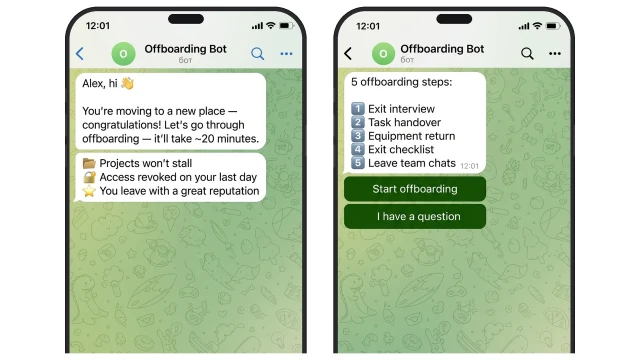
The bot runs in Telegram, Slack or MAX — wherever the team works. The first message explains to the employee why offboarding matters for them personally: reputation, a proper close, helping the team. When employees understand the personal value — completion rates are higher and HR doesn't need to follow up at every step.
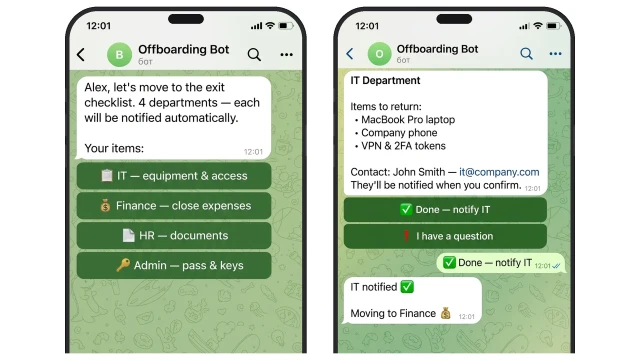
The bot guides the employee through each department in the exit checklist — IT, Finance, HR, Admin. For each item, the bot shows what to hand over and to whom, and automatically notifies the responsible person — no phone calls, no manual reminders from HR.

How the exit checklist works:

💻 IT — return equipment, revoke access and VPN. IT receives automatic notification

💰 Finance — close expense reports and travel advances

📄 HR — sign termination documents

🔑 Admin — return badge, keys, parking pass

Final — HR receives a card with the status of each item
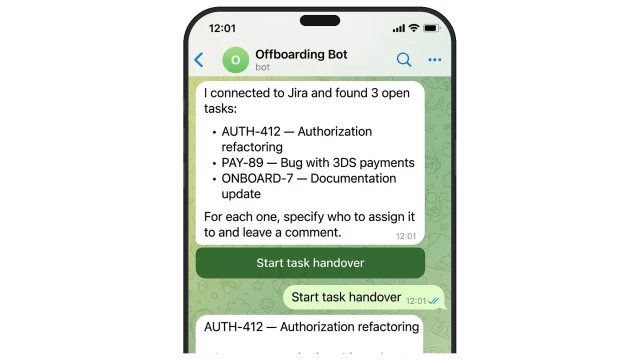
With Jira or Asana integration, the bot automatically pulls the employee's open tasks and handles the handover right in the chat: for each task it asks who to transfer it to and prompts for a comment for the successor. Data is saved to a table — no templates, no links, no manual filling.
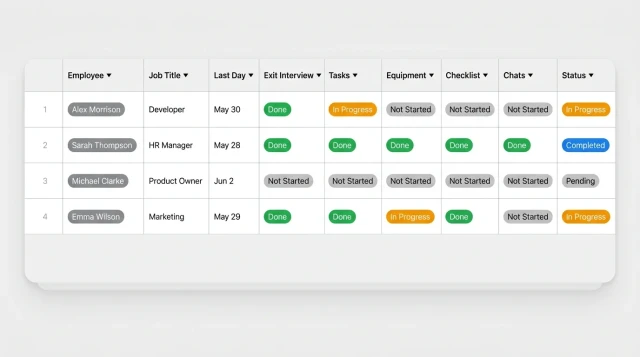
HR sees the status of each stage for every departing employee in real time. Who completed the exit interview, who hasn't returned equipment, where the exit checklist is stuck — all in one table without manual tracking.
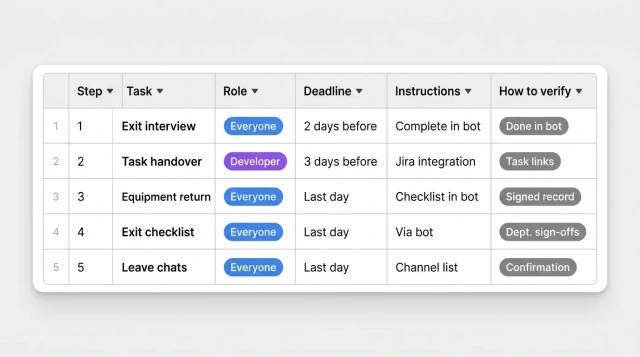
HR loads the task plan once — each role gets its own set of stages. The bot issues tasks at the right moment with instructions. The employee can write a reply in the bot, send a document or record a voice message — to document the handover in any format.

How to get started

The template runs on the Business plan. Setup for your company — from $500 one-time.

1. Book a demo

We'll discuss your offboarding process, walk you through the capabilities and propose a setup plan

2. We'll hold a pre-setup meeting

We'll gather information: roles, task handover requirements, equipment lists, regulations

3. We launch and test the bot

We'll load the task table by role, connect the ATS (Workday) or set up launch via link / QR code

4. Pay for the setup

Only after you've confirmed everything works

What to prepare:

📋 Task table by role — list of stages for each role (we can help build it)
🔗 ATS access (Workday) — for auto-launch when an employee is marked as leaving
🏢 List of departments for the exit checklist — IT, Finance, HR
📩 Contacts of responsible parties — who receives the final status card

What else you can connect

The template expands to fit your processes:

📋 Task trackers — Jira, Asana, YouTrack: the bot automatically analyzes the employee's open tasks

🗂️ Knowledge bases — Notion, Confluence: link to the handover template is inserted automatically

✉️ Email notifications — HR and IT receive an email with the summary of each stage

FAQ

How does the bot know an employee has left?

Via ATS integration (Workday): when the employee status changes, the bot launches automatically. Alternative — HR sends the employee a personal link or QR code manually.

Do I need to configure the bot for each role separately?

No. HR loads the task table once with sets of stages for different roles. The bot automatically applies the right set based on the departing employee's role.

How does the AI exit interview work?

The AI conducts the interview adaptively: each next question depends on the previous answer. If the employee cites "career growth" as the reason, the AI follows up on exactly what — promotion, new challenges, or salary. The depth of insight is higher than a static form.

What happens to the exit interview results?

Answers are saved to the BuddyBot table. HR sees a structured summary for each employee: reasons for leaving, team and process ratings, NPS indicator.

Can I use the template without ATS integration?

Yes. HR sends the employee a personal link or QR code — the bot launches manually. ATS integration speeds up the process but is not required.

Which messengers does the bot support?

Telegram, Slack and MAX (VK Teams). HR selects the channel during setup — the bot adapts to the messenger interface. Can run in multiple channels simultaneously.