




header.phone_number boris@borisbot.com

Corporate Raffle in Slack: Employee Giveaway Bot

Bot runs a raffle in Slack: announces the prize in the channel, registers participants, and selects the winner automatically.

You need to log in to see the interactive example.

You need to log in to see the interactive example

Copyright protection from copying

landing.complain

HR launches a raffle in the corporate Slack channel: the bot posts an announcement with the prize and a participation button, employees register with one click and receive a personal DM confirmation. On the set date, the bot randomly selects a winner and posts the result to the channel. Example: a marketing team at an IT company — announced an Amazon Gift Card $50 prize, 23 participants in one day, winner selected automatically with no HR involvement.

Why it works

🎯 One-click participation — no forms, no manual spreadsheets

🤖 Winner selected randomly and automatically — transparent and fair

📊 All participants in the BuddyBot table with department and registration time

💬 Bot works directly in Slack — where your team already communicates every day

KPIs

⚡ Launch a raffle — 15 minutes from idea to channel announcement

👥 Up to 100% team reach — the bot writes where everyone already is

🔄 0 manual work — registration, counting and winner announcement automatically

📋 100% transparency — participant list available via button at any time

Who it is for

Example: IT companies and marketing teams, adaptable to any corporate environment with Slack: startups, technology companies, international teams, digital agencies.

How it works

The bot works in four steps: HR sets the raffle parameters in BuddyBot — prize, announcement text, results date. The bot posts the announcement in the Slack channel with a participation button. Employees register with one tap and receive a personal DM confirmation. On the set date, the bot randomly selects a winner and posts the result to the channel.
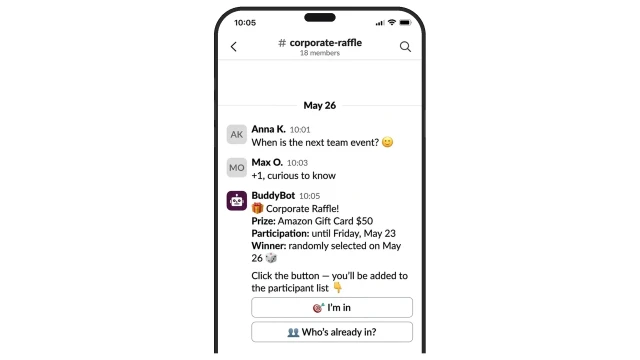
The bot posts the raffle announcement in the corporate Slack channel: prize, participation deadline and results date. Employees register with one button click right in the chat.
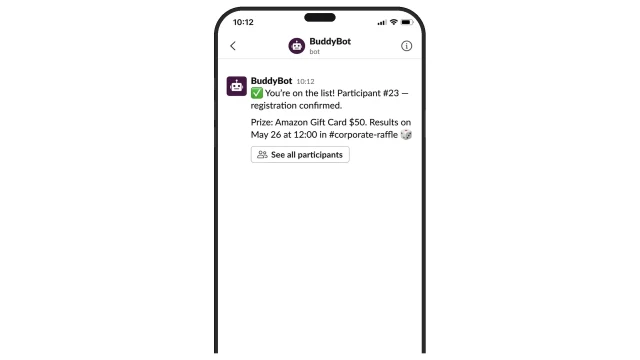
Each participant receives a personal DM confirmation with their number and raffle details. The participant list is available via button in the channel.
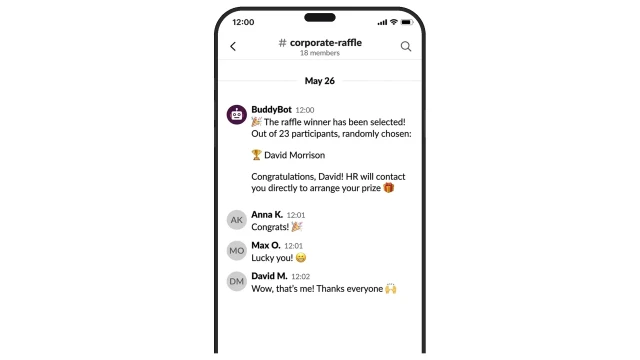
At the scheduled time, the bot posts the winner's name in the channel. Colleagues congratulate them right in the thread.
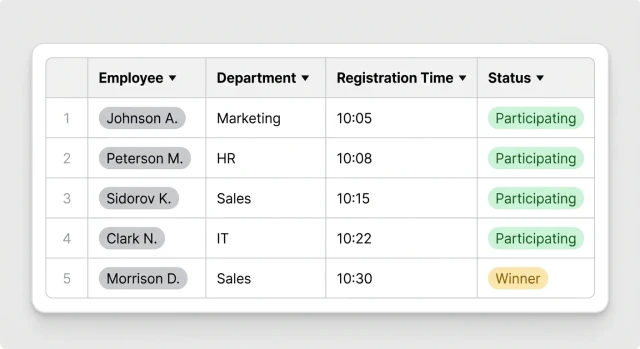
All participants in one table: name, department, registration time and status. The winner is marked automatically.

How to get started

1. Get the Starter+ plan

Starter+ plan from $25/mo — includes everything you need to launch the bot.

2. Copy the template and schedule a call

A BuddyBot manager will set up the scenario to your needs: prize, announcement text, results date.

3. Connect Slack

Add BuddyBot to your corporate Slack and invite it to the relevant channel. Your manager will send the instructions.

4. Set up the raffle

Specify the prize, announcement text and results date. The bot will post the announcement at the right time automatically.

5. Ready — launch your first raffle

Employees register with one button click. On the set day the bot randomly selects a winner and posts the result to the channel.

What else you can connect

📊 Excel import — upload employee list from a file

📋 BuddyBot tables — manage participants and statuses directly in the service

🔁 Recurring raffles — set up a schedule for regular corporate contests

💬 Multiple channels — run a raffle in several Slack channels independently

Frequently asked questions

How does the bot post the announcement to a Slack channel?

BuddyBot is added to your corporate Slack as an app and invited to the relevant channel. At the scheduled time it sends a message with buttons automatically — no manual action needed from HR.

How is the winner selected?

On the specified day the bot takes the list of registered participants and picks one at random. The result is posted to the channel automatically.

Do employees need to install anything?

No, BuddyBot works directly in Slack — employees use the messenger they already know.

Can employees see who has already registered?

The participant list is available via the "Who is already in?" button in the channel. The full list is stored in BuddyBot tables.

Can we run multiple raffles in a row?

Yes. Each new raffle is set up separately: new prize, new dates, new participant list. Previous history is saved.