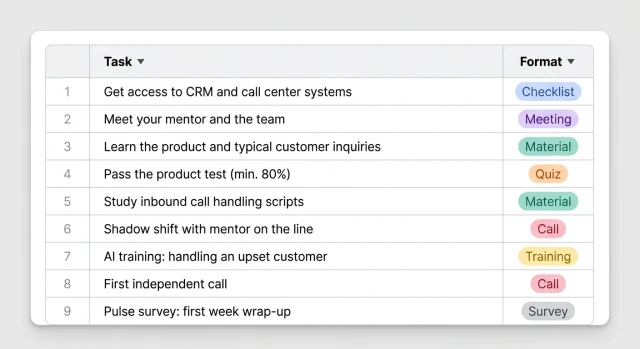
 Talpha







How it works
HR sends the new agent a bot link — via email, QR code, or automatically from Greenhouse. The agent opens the bot in Telegram and immediately receives a 30-day plan. The bot guides them through each stage — product and systems in week one, AI role-play in week two, first independent calls by the end of the month.
From day one, the agent knows what to do and who to ask — no stack of documents, no hour-long onboarding call.
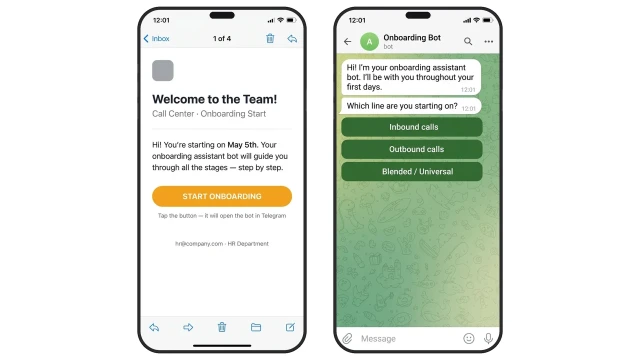
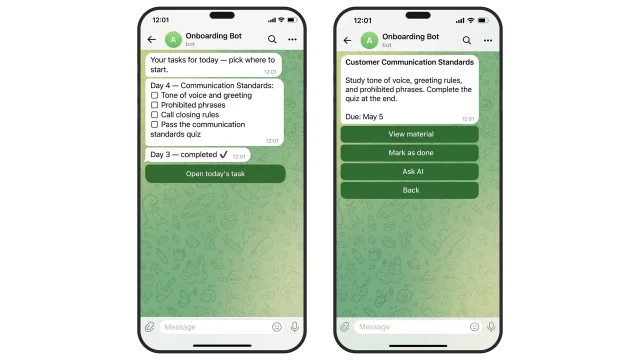
Each day the bot sends a task from the plan: what to study, what to complete, what to mark as done — all structured.
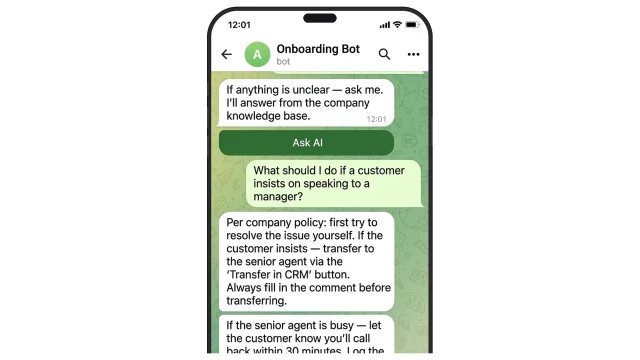
If anything is unclear, AI answers from the company knowledge base — no calls to HR or the mentor.
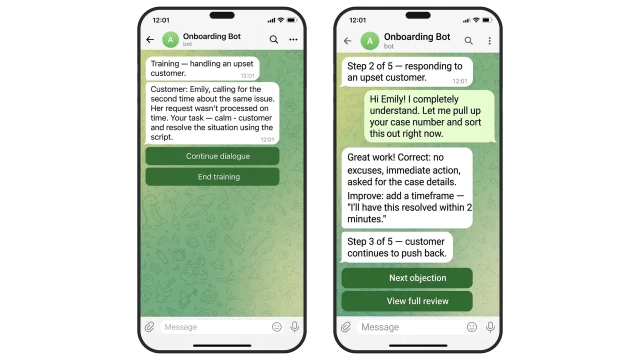
AI plays the role of a customer and trains agents on handling difficult interactions. After each session — a full debrief: what worked and what to improve.
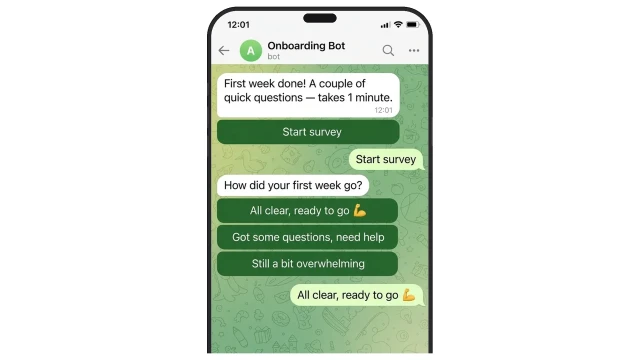
On day 7 and day 30 the bot automatically sends a pulse survey — the team lead learns about issues before the agent starts looking for another job.
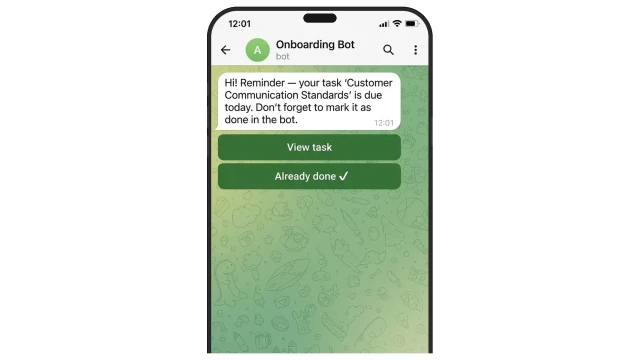
If a task is not completed on time, the bot automatically sends a reminder — no manual follow-up from HR or the team lead.
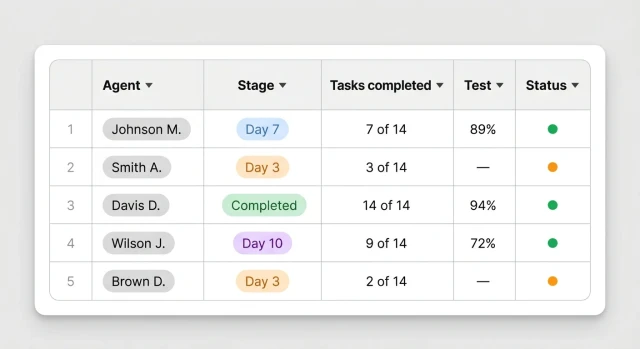
The team lead sees every agent's progress in a shared dashboard: which stage they're on, how many tasks are done, and their test score.
The template already includes a ready-made call center agent onboarding plan — tasks load automatically. All you need to do is adapt them to your processes and scripts.
Day 1.
Task: Get to know the company, team, and work rules.
What to do: Meet HR and your mentor, learn the team structure, schedule, communication channels, rules, and where to find help.
How to check: Complete the Day 1 checklist in the bot and answer 3 quick questions.
Day 2.
Task: Understand the product and the customer.
What to do: Learn what the company sells or supports, who the customers are, and what requests they bring.
How to check: Mini-quiz and a short recap 'who is our customer and what matters to them'.
Day 3.
Task: Master knowledge sources and escalation paths.
What to do: Study scripts, regulations, FAQ, and templates; understand who to ask about what; practice finding answers and asking the mentor.
How to check: 3 situations in the bot: 1) answer is in a document, 2) answer needs mentor, 3) case needs escalation.
Day 4.
Task: Learn communication standards.
What to do: Tone of voice, greeting, call closing, prohibited phrases, rules for chat and phone calls.
How to check: Quiz with correct phrasing selection from multiple options.
Day 5.
Task: Review typical customer requests.
What to do: Study 5-7 most frequent cases and ready-made response scripts.
How to check: Case test with action choice for each scenario.
Day 6.
Task: Understand work tools.
What to do: CRM, customer card, statuses, comments, case transfer, logging the result.
How to check: Practical task in the system or bot simulation.
Day 7.
Task: First soft practice.
What to do: Complete a simulation of 3-5 dialogues with simple customer questions.
How to check: Bot scores answers with a checklist; mentor reviews errors.
Day 8.
Task: Learn to handle the unknown.
What to do: What to do when you do not know the answer, when to escalate, how not to lose the customer.
How to check: Walkthrough of 'I do not know' and 'needs transfer' situations.
Day 9.
Task: First responses under supervision.
What to do: Handle simple requests with mentor support or using templates.
How to check: 2-3 dialogues reviewed by supervisor or mentor.
Day 10.
Task: Mid-point check and error review.
What to do: Revisit problem topics, discuss what is still difficult, define an improvement plan.
How to check: Short quiz + mentor feedback in the bot.
Day 11.
Task: Build independence.
What to do: Handle more tasks without hints, but with the option to ask the bot.
How to check: Auto-check via checklist and spot-check of dialogues.
Day 12.
Task: Practice difficult phrasing.
What to do: Negativity, objections, hesitant customers, repeat requests, conflict situations.
How to check: Dialogue simulation with answer scoring.
Day 13.
Task: Near-independent shift work.
What to do: Work the standard task flow using the knowledge base and standard scripts.
How to check: Metrics, task status, share of requests handled without help.
Day 14.
Task: Onboarding wrap-up and development plan.
What to do: Complete the final test, receive feedback, define growth areas for the next month.
How to check: Final score, onboarding status, report for HR and team lead.
Task: Get to know the company, team, and work rules.
What to do: Meet HR and your mentor, learn the team structure, schedule, communication channels, rules, and where to find help.
How to check: Complete the Day 1 checklist in the bot and answer 3 quick questions.
Day 2.
Task: Understand the product and the customer.
What to do: Learn what the company sells or supports, who the customers are, and what requests they bring.
How to check: Mini-quiz and a short recap 'who is our customer and what matters to them'.
Day 3.
Task: Master knowledge sources and escalation paths.
What to do: Study scripts, regulations, FAQ, and templates; understand who to ask about what; practice finding answers and asking the mentor.
How to check: 3 situations in the bot: 1) answer is in a document, 2) answer needs mentor, 3) case needs escalation.
Day 4.
Task: Learn communication standards.
What to do: Tone of voice, greeting, call closing, prohibited phrases, rules for chat and phone calls.
How to check: Quiz with correct phrasing selection from multiple options.
Day 5.
Task: Review typical customer requests.
What to do: Study 5-7 most frequent cases and ready-made response scripts.
How to check: Case test with action choice for each scenario.
Day 6.
Task: Understand work tools.
What to do: CRM, customer card, statuses, comments, case transfer, logging the result.
How to check: Practical task in the system or bot simulation.
Day 7.
Task: First soft practice.
What to do: Complete a simulation of 3-5 dialogues with simple customer questions.
How to check: Bot scores answers with a checklist; mentor reviews errors.
Day 8.
Task: Learn to handle the unknown.
What to do: What to do when you do not know the answer, when to escalate, how not to lose the customer.
How to check: Walkthrough of 'I do not know' and 'needs transfer' situations.
Day 9.
Task: First responses under supervision.
What to do: Handle simple requests with mentor support or using templates.
How to check: 2-3 dialogues reviewed by supervisor or mentor.
Day 10.
Task: Mid-point check and error review.
What to do: Revisit problem topics, discuss what is still difficult, define an improvement plan.
How to check: Short quiz + mentor feedback in the bot.
Day 11.
Task: Build independence.
What to do: Handle more tasks without hints, but with the option to ask the bot.
How to check: Auto-check via checklist and spot-check of dialogues.
Day 12.
Task: Practice difficult phrasing.
What to do: Negativity, objections, hesitant customers, repeat requests, conflict situations.
How to check: Dialogue simulation with answer scoring.
Day 13.
Task: Near-independent shift work.
What to do: Work the standard task flow using the knowledge base and standard scripts.
How to check: Metrics, task status, share of requests handled without help.
Day 14.
Task: Onboarding wrap-up and development plan.
What to do: Complete the final test, receive feedback, define growth areas for the next month.
How to check: Final score, onboarding status, report for HR and team lead.