




header.phone_number boris@borisbot.com

AI Candidate Reactivation Bot: Email + SMS + Telegram

AI bot reactivates stuck candidates via Email, SMS, and Telegram — notifies recruiter instantly.

You need to log in to see the interactive example.

You need to log in to see the interactive example

show More

Copyright protection from copying

landing.complain

The recruiter connects an ATS via webhook — the bot handles the rest. A candidate has been stuck at "Test Task" for 5 days — the bot notifies the recruiter in Telegram: "Anna Smith hasn't progressed in 5 days. Launch outreach sequence?" The recruiter taps "Yes" — AI generates a personalized message and launches the series: email on day 1, Telegram on day 3, SMS on day 7. The candidate replies — the recruiter gets an instant notification and continues hiring.

Why it works

🔁 Recruiters save time — no manual follow-ups, no forgotten candidates
🎯 AI personalizes each message to the role and pipeline stage
📊 Full analytics: who replied, who ignored, conversion to offer
⚡ Multi-channel series increases reply rate up to 3x vs single-channel

KPI

📬 Up to 40% reply rate from previously cold candidates
⏱️ 70% less time spent on manual follow-ups
🏆 2x more candidates reach the offer stage
📈 Pipeline velocity increases by 30%

Who it's for

Based on a TechCorp example, adaptable for any company that hires at scale: tech companies, agencies, staffing firms, HR departments with 50+ active candidates per month.

How it works

On average, 40% of candidates stall at some stage — they haven't declined, they just stopped responding. Recruiters waste time on manual follow-ups or lose the candidate entirely. The bot monitors every status in your ATS and tracks who is stuck — the recruiter gets an alert in Telegram and can launch reactivation in one click.
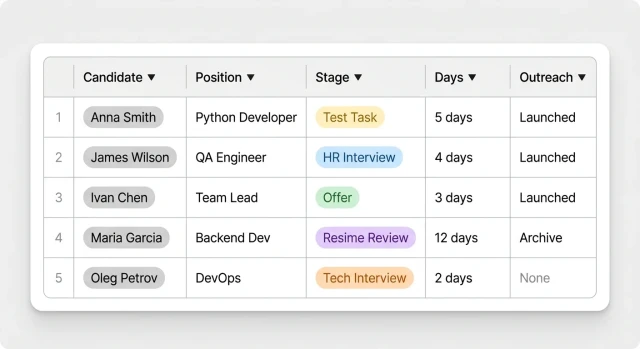
A candidate stalls at a stage — the bot detects it automatically and notifies the recruiter in Telegram. The alert includes the candidate's name, position, and number of days without progress. The recruiter taps "Yes" — and the outreach sequence launches automatically. No need to remember, no manual writing.
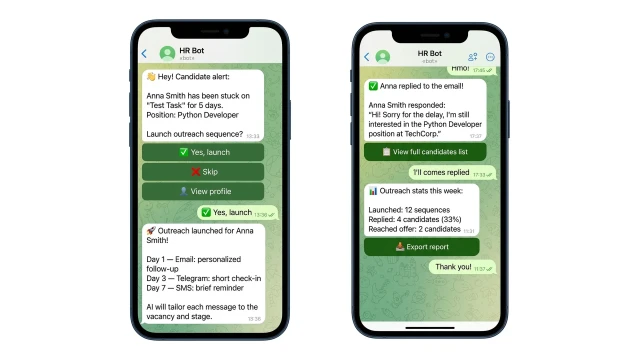
What does the AI evaluate?

❓ How long has the candidate been inactive at their current stage?
✅ AI compares against stage-specific thresholds (e.g. 3 days for Test Task, 5 days for Offer)

❓ What message tone fits this candidate?
✅ AI adjusts tone based on stage — encouraging for early stages, urgent for offer stage

❓ Which channel should be used first?
✅ AI selects based on available contacts: Telegram → Email → SMS

❓ Is the candidate worth reactivating?
✅ AI considers time since last activity, response history, and stage priority
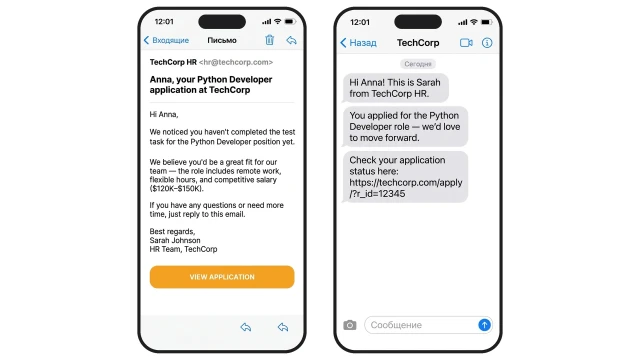
AI generates a personalized message for each candidate — tailored to the role and pipeline stage. The sequence runs across three channels: email on day 1, Telegram on day 3, SMS on day 7. When the candidate replies — the recruiter gets an instant notification and can continue hiring.

How to get started

Template runs on the Business plan — from $249/mo. One-time setup fee: $499.

1. Connect your ATS via webhook

Greenhouse, Lever, Workable, or any system with webhook support

2. Set inactivity thresholds per stage

Configure how many days trigger an alert for each pipeline stage

3. Configure Telegram bot for recruiter notifications

The bot will notify the recruiter and await approval before sending

4. Connect Email and SMS accounts

Gmail, Outlook, Twilio, MessageBird — or any SMTP/API provider

5. Pay for setup — $499

Only after you have verified that everything works correctly

What else can you connect

Additional triggers: offer without response → reminder; candidate from archive matches a new vacancy; cold database reactivation.

Channels: Telegram (main channel). Connect WhatsApp, Instagram or Viber as additional channels.

Integrations: Greenhouse, Lever, Workable, Talentix — any system with webhook. For teams without ATS — HubSpot or Salesforce.

Frequently asked questions

Which ATS systems does the bot support?

Any system that supports webhooks or API — Greenhouse, Lever, Workable, and others. A specialist will help connect it during setup.

How does the AI know what to write to a candidate?

AI takes into account the job title, pipeline stage, and communication channel. You can set the tone and key messages — the bot adapts them for each candidate.

What if the candidate doesn't respond on any channel?

After the full outreach sequence, the candidate moves to archive. The recruiter receives a final summary with results across all three channels.

Can I customize the outreach schedule?

Yes. The days, channels, and order of messages are configured to your hiring process during initial setup.