



header.phone_number boris@borisbot.com

Webinar Registration Telegram Bot: Reminders & AI Assistant

Bot registers webinar participants, sends reminders, and answers product questions using AI.

You need to log in to see the interactive example.

You need to log in to see the interactive example

Copyright protection from copying

landing.complain

The organizer posts a webinar announcement in a Telegram channel with a "Register" button — the participant clicks it, the bot asks 2 questions, collects an email, and instantly sends the webinar link. Before the event, the bot sends automated reminders: 1 day, 1 hour, and 10 minutes before. At any time, participants can ask questions — the AI answers based on the product knowledge base: curriculum, speaker, pricing, terms. After the webinar, the bot sends the recording and offers a paid product.

Why it works

📱 1-click registration — directly from the post, no forms or landing pages

🔔 Reminder sequence increases show-up rate from 40% to 70–80%

🤖 AI answers product questions — participants arrive warmer, conversion to paid is higher

♻️ Post-webinar follow-up converts those who didn't buy during the live session

KPIs

📊 Show-up rate +30–40% — automated reminders keep registrants engaged

💰 Conversion to paid ×1.5–2 — follow-up hits at peak interest

🤖 Up to 80% of participant questions handled by AI — no organizer time spent

⏱ Save 5–8 hours per webinar on manual outreach, contact collection, and Q&A

Who it's for

Shown with a financial literacy school example, adaptable to any webinar: experts and coaches, EdTech and online courses, info-business, corporate training, marketing agencies.

How it works

A participant sees the webinar announcement in a Telegram channel and clicks the button — the bot registers them in 2 minutes: asks 2 questions, collects an email, and sends a confirmation with the event link. The bot then runs on autopilot: sends reminders 1 day, 1 hour, and 10 minutes before, answers product questions via AI, and after the webinar sends the recording and a paid product offer.
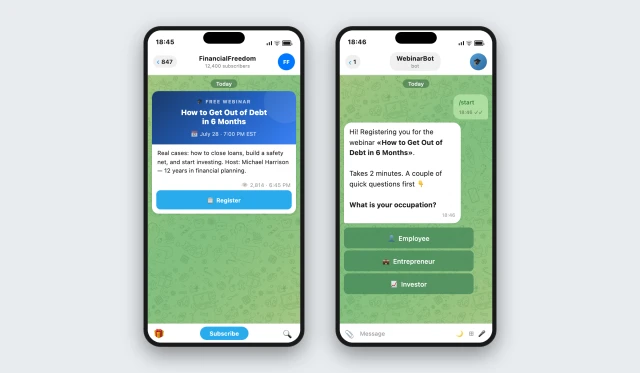
Registration from a Telegram channel post — participants never leave the app.
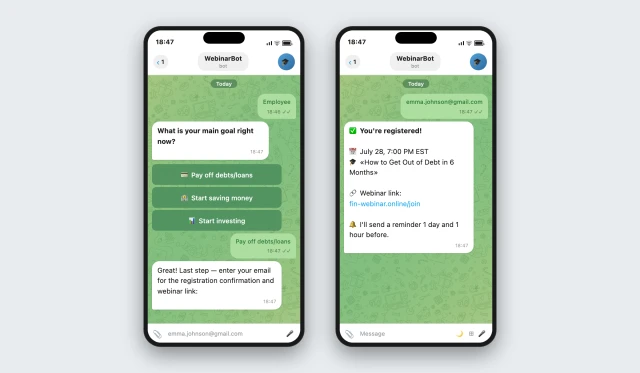
Who are you? — employee / entrepreneur / investor

What is your main goal? — pay off debt / start saving / invest

✅ AI assigns a segment → after the webinar each participant gets a personalized offer
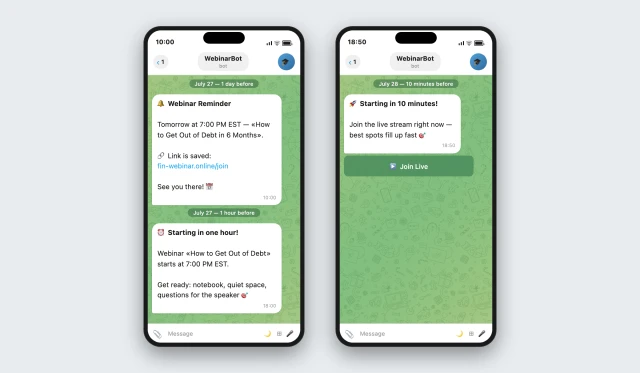
3 reminders are sent automatically: 1 day, 1 hour, and 10 minutes before the start. Show-up rate increases by 30–40% compared to registration without reminders.
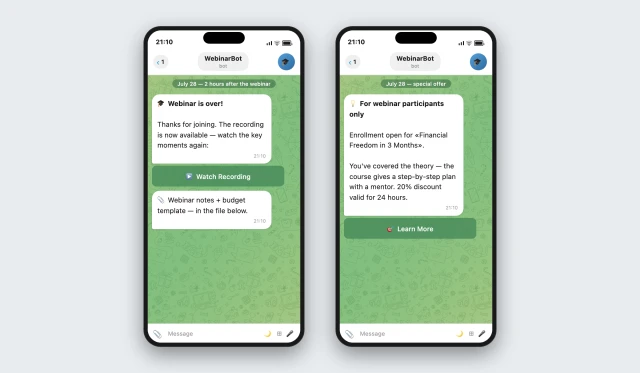
2 hours after the webinar, the bot sends the recording and a special offer for the paid product. The follow-up hits at peak interest.
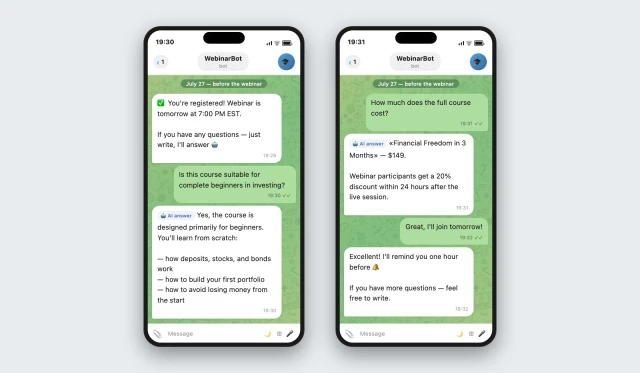
The AI assistant answers product questions at any time — curriculum, pricing, who it's for. Participants arrive at the webinar already warmed up.

How to get started

1. Subscribe to the Starter+ plan

Starter+ plan from $19/mo — includes everything needed to launch the webinar registration bot. No coding required.

2. Copy the template and book a setup call

A BuddyBot manager will configure the scenario for your webinar: qualification questions, reminder schedule, and post-webinar follow-up.

3. Connect your Telegram bot and publish the button in your channel

Participants click the button directly in the post — the bot opens in Telegram.

4. Launch the template

First registrations arrive on day one.

Add-ons available

🔗 HubSpot / Salesforce — participants are added to your CRM with a segment tag right after registration

🔗 Repeat webinars — run your next session to the same registered audience

Frequently asked questions

How long does registration take?

1–2 minutes: 2 questions + email. Minimal steps to confirmation.

When are reminders sent?

24 hours, 1 hour, and 10 minutes before the start. Schedule is customizable.

How does the bot segment the audience?

Based on 2 answers, the bot assigns a segment. After the webinar, each segment can receive a different offer.

Where is participant data stored?

In BuddyBot's database. When CRM is connected — also in HubSpot or Salesforce.

Can I run multiple webinars at the same time?

Yes, each webinar is a separate template with its own schedule and audience.