



header.phone_number boris@borisbot.com

Telegram Ad Sales Bot: Mediakit & Autopublishing

Automate ad sales in your Telegram channel: mediakit, booking, and Stripe payments — 24/7 without admin involvement.

You need to log in to see the interactive example.

You need to log in to see the interactive example

Copyright protection from copying

landing.complain

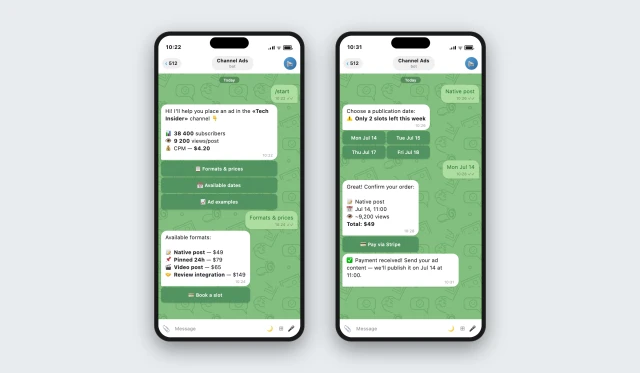
An advertiser finds the bot link in the channel profile and starts a conversation. The bot immediately shares audience stats, reach, and CPM — no calls or DMs with the admin needed. After reviewing the numbers, it offers to choose a format and date, accepts payment via Stripe, and confirms the booking.

Why it works

📊 Mediakit in the bot — advertisers see the numbers instantly, no manual stats requests

💳 No invoices — the bot accepts payments via Stripe directly in the chat

⏰ Autopublishing — posts go live on schedule, no admin involvement required

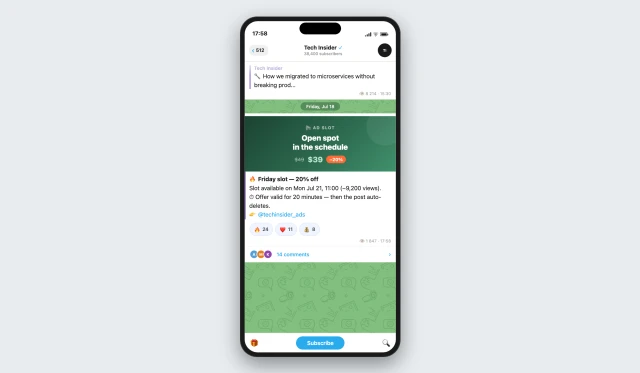
🔥 Discount offer — a free slot becomes an urgent sale in 20 minutes, not lost revenue

KPIs

📋 Zero lost leads — the bot logs every booking to a table and sends reminders on publish day

💰 Free slots sell automatically — a Friday 20% discount offer fills gaps without calls or messages

0 minutes of admin routine — booking, payment and publishing run 24/7 without human involvement

📈 Advertisers come back on their own — a smooth bot experience with no back-and-forth lowers the repeat-order barrier: from first contact to payment in 3 steps

Who is it for

Shown for a Tech channel, adaptable for any Telegram channel owner with an ad-based model: news, lifestyle, business, education, local communities, city pages.

How it works

An advertiser finds the bot link in the channel profile and messages it. The bot immediately shares the mediakit: audience size, reach and CPM — no calls or DMs with the admin. After reviewing the numbers, it shows available formats and how many slots are left this week.

The bot shows only available dates — taken slots are not displayed. The advertiser sees real scarcity and decides faster. They choose a date, confirm the order and pay via Stripe directly in the chat — no invoices, emails or manual confirmation needed.

What the bot checks

❓ Which format does the advertiser need?

✅ Native post, pinned 24h, video post or review integration — the bot shows prices and reach for each.

❓ Which date is available?

✅ The bot shows only free slots — no double bookings possible.

❓ Has payment been received?

✅ After Stripe payment the slot is confirmed automatically — no manual checking needed.

❓ Has the ad content been uploaded?

✅ The bot reminds the advertiser to send materials before the publish date.
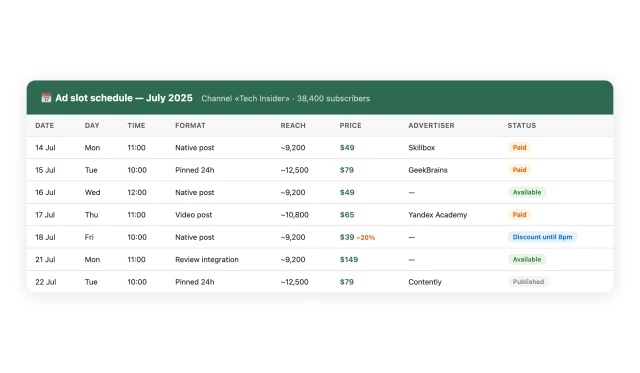
All bookings are automatically logged to a table: advertiser, format, publish date, payment status. The channel owner sees the schedule weeks ahead and knows exactly how much has been earned — no spreadsheets or chats needed.
How to get started

1. Book a demo

We will discuss your channel, audience and choose the best monetization model.

2. Connect your payments

Set up Stripe to accept payments from advertisers directly in the bot.

3. The bot starts working

It accepts bookings, holds slots and publishes posts without your involvement.

What else you can connect

💳 Stripe — accept payments from advertisers directly in the bot

📊 BuddyBot built-in tables — automatic export of bookings and revenue

📬 Email/Telegram notifications — get an alert for every new payment

🔗 HubSpot / Salesforce / Zapier — send advertiser data to your CRM for repeat sales

FAQ

How much does it cost to set up the bot?

Two options: free with a commission per payment processed through the bot, or a fixed subscription. The best fit is discussed individually on the demo.

Does the bot publish posts to the channel by itself?

Yes — it publishes directly via the Telegram Bot API. No third-party services needed. Just give it admin rights in your channel.

What if an advertiser paid but did not send the content?

The bot automatically reminds them to upload materials. If nothing is received before the publish date, the admin gets a notification.

Can different formats and prices be set for each slot?

Yes — each slot is configured separately: format, time, price and number of spots.

How does the Friday discount offer work?

At the end of the week the bot checks for unfilled slots. If any are free — it posts a discount offer, sets a 20-minute timer and auto-deletes the post.