




header.phone_number boris@borisbot.com

Sales Associate Hiring Bot: Indeed + Workday

Bot screens sales associate applicants from Indeed, saves qualified candidates to Workday, and continues the conversation in Telegram. No manual calling.

You need to log in to see the interactive example.

You need to log in to see the interactive example

Copyright protection from copying

landing.complain

Every day new applications arrive for sales associate positions on Indeed — and most are irrelevant. Instead of manual calls, the bot contacts each applicant, sends a link to a 2-minute browser screening, and results go straight to Workday. Qualified candidates continue in Telegram, rejected ones receive a referral link — they can bring a suitable friend for a bonus.

Why it works

⚡ Instant results — the candidate doesn't wait for a call, HR doesn't waste time on unqualified applicants

🎯 Buttons instead of forms — minimal barrier, even form-averse candidates complete the screening

🔁 Referral mechanics — rejected candidates bring new applicants at zero advertising cost

📲 Candidates stay in the messenger — re-engage them with broadcasts at any time

Solution KPIs

⏱ −80% HR time on initial screening of irrelevant applications

📋 100% of applications processed automatically — none are lost

📁 "Qualified" status and screening answers already in the Workday profile — HR calls prepared

👥 +15–20% more candidates through the referral channel at no extra cost

Who it's for

Built on an electronics retail chain example, adapts to any retail with high staff turnover: sales associates, cashiers, floor administrators, promoters, merchandisers.

How it works

The applicant applies for a sales associate position and immediately receives a link to the bot inside Indeed. Four button-based questions filter out unsuitable candidates automatically. Those who pass receive a "Qualified" status in Workday: the bot finds the candidate by phone number and updates the profile or creates a new one. Screening answers are saved in the profile — HR sees everything before calling. In Telegram, the bot briefly introduces the company and confirms that HR will follow up shortly. Rejected candidates receive a referral link: recommend a suitable friend and if they get hired — you receive a bonus.
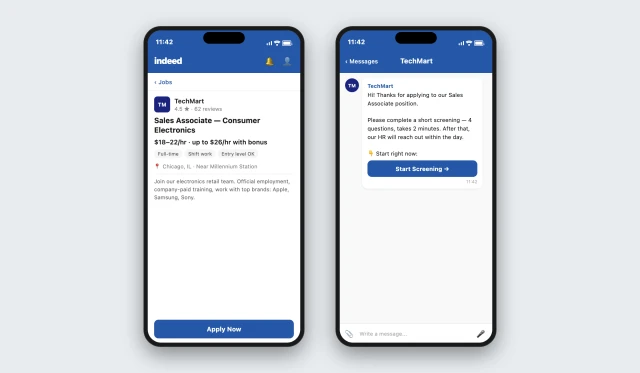
The job is posted on Indeed — the auto-reply to each application arrives immediately. The candidate clicks the link and opens the bot in their browser to complete a 2-minute screening.
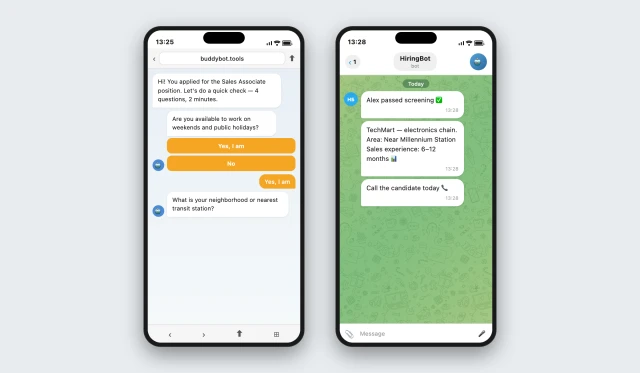
Four questions — the bot filters candidates who don't meet minimum requirements.

Example questions:

Are you available to work on weekends and public holidays?

✅ Only "Yes" continues the screening. "No" triggers automatic rejection.

What is your neighborhood or nearest transit station?

✅ Answer is recorded in the Workday profile — HR sees it before calling and assesses commute distance.

Are you available for shift work, including evenings?

✅ Only "Yes" continues the screening. "No" triggers automatic rejection.

Do you have sales experience?

✅ Answer is recorded: No experience / Under 6 months / 6–12 months / Over a year — saved to Workday, HR sees it before calling.

After completing all questions, the conversation automatically moves to Telegram.
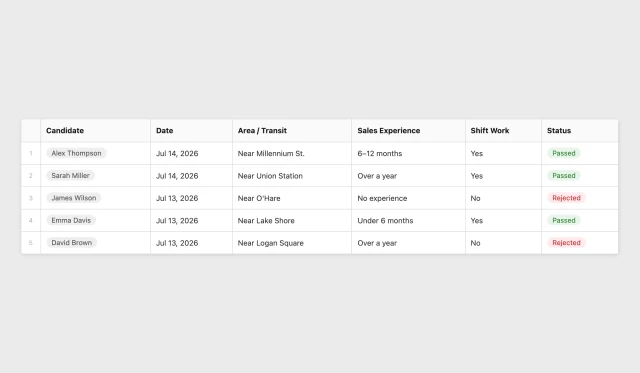
All candidate answers are saved to a table in real time — no manual data entry.
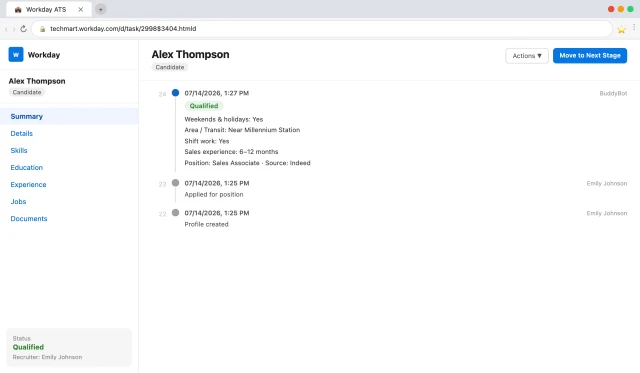
The bot finds the candidate in Workday by phone number — updates an existing profile or creates a new one. Status changes to "Qualified", screening answers are saved to the profile. No duplicates — HR works with a clean database.

How to get started

Template runs on the Business plan. Setup for your job posting — from $299 one-time.

1. Book a demo

We'll discuss your hiring needs, walk you through the capabilities, and propose a setup plan

2. Pre-setup meeting

We'll discuss the position, screening questions, Workday and Telegram integration

3. Bot launch and testing

We connect Indeed, configure the screening, and test the full flow

4. Pay after testing

Only after you've confirmed everything works

Add-ons available

🤖 AI answer evaluation — instead of buttons, the bot analyzes free-text answers and scores the candidate.

💼 LinkedIn — same integration with LinkedIn job applications: one bot handles both sources.

✈️ Telegram — bot moves the candidate conversation from the browser directly to Telegram.

📊 Analytics — conversion rate at each stage of the hiring funnel.

Frequently asked questions

What does a rejected candidate see?

The bot politely informs them of the mismatch and offers a referral link: if they recommend a suitable friend who gets hired — they receive a bonus.

Do I need to post the job on Indeed separately?

Yes. You post the job on Indeed as usual. BuddyBot connects via API and responds to every new application automatically.

Is phone number and name entered manually?

No — data is pulled from the Indeed profile. The candidate doesn't need to fill anything in.

Can I customize the screening questions?

Yes. Questions are configured in the BuddyBot builder without coding — any criteria: location, availability, certifications, software knowledge, and more.

Does the template work for other positions?

Yes. The flow adapts to any frontline role: cashiers, call center agents, warehouse staff, promoters. Just change the question text.