




header.phone_number boris@borisbot.com

AI Legal Client Intake Bot for Law Firms

AI bot on your website qualifies the client's legal situation and books a free consultation — no forms or phone calls.

You need to log in to see the interactive example.

You need to log in to see the interactive example

show More

Copyright protection from copying

landing.complain

A visitor lands on a law firm website — within 10 seconds, a widget asks: "Got a legal question?" The client describes their situation: unpaid wages, landlord dispute, divorce settlement. The bot clarifies one key detail and offers to continue in Telegram — where AI analyzes the situation in depth and offers a free 15-minute consultation with an attorney. The lead is passed to the specialist already with a summary of the situation.

Why it works

⚡ Partial answer immediately — the client sees value before booking
🔒 Free consultation — removes the fear of being pushed into paid services
📱 Seamless transition to Telegram — familiar channel, no forms or phone calls
🎯 Lead is already qualified — the attorney knows the issue before the meeting

KPI

📈 2–3x higher website-to-lead conversion vs. contact forms
⏱️ Average response time: under 1 minute
🏆 Up to 60% of leads book a consultation after the first bot interaction
💼 Attorney spends 40% less time on initial intake

Who it's for

Based on a LawFirm Online example, adaptable for any legal practice: solo attorneys, law firms, online legal services, legal tech startups handling labor, family, civil, or contract law.

How it works

A visitor lands on the law firm website — within 10 seconds the widget softly activates and asks about the situation. Instead of a cold form, the client gets a live conversation: they describe the problem, the bot asks one clarifying question, gives a partial answer — and the client already feels value before any commitment.
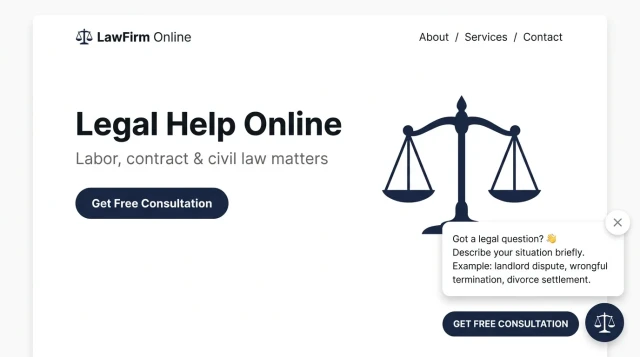
Instead of a form — a live dialogue: website-to-lead conversion grows 2–3x
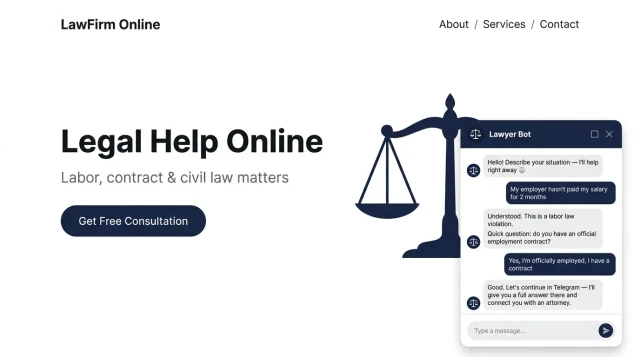
AI answers partially — the client gets value immediately and agrees to a free consultation with an attorney
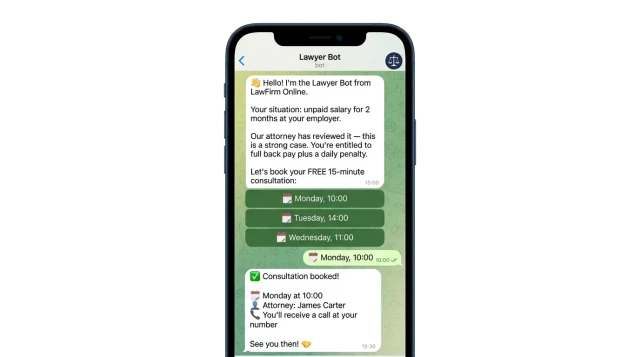
The client books a consultation — the attorney receives the name and case summary in advance

How to get started

Template runs on the Starter+ plan — from $19/mo.

1. Register at BuddyBot and copy the template

Takes 5 minutes — no coding required

2. Add the widget to your website

Paste one line of code or install the plugin for WordPress / Tilda / Webflow

3. Set up the legal knowledge base

Add your practice areas, typical cases, and attorney profiles

4. Connect Telegram for lead notifications

Attorneys receive new leads instantly with the case summary

What else can you connect

Additional triggers: follow-up if client didn't book; reminder before consultation; post-consultation feedback collection.

Channels: Telegram (main channel). Connect WhatsApp or Instagram as additional channels.

Integrations: CRM (HubSpot, Salesforce), calendar booking (Calendly), website builders (WordPress, Tilda, Webflow, Wix).

Frequently asked questions

Does the bot only answer questions from the knowledge base?

The bot uses the knowledge base for typical questions, but AI can also handle free-form legal queries — giving a partial answer and directing to an attorney for details.

How does the bot know what legal advice to give?

You configure the knowledge base with your practice areas, typical cases, and standard answers. AI adapts each response to the specific situation described by the client.

Is client data secure?

All conversations are stored on BuddyBot servers with encryption. You control data retention and can configure GDPR-compliant data handling.

Can I customize the bot's appearance to match my firm's branding?

Yes — logo, colors, bot name, and greeting message are fully customizable in the template settings.